
Welcome again Oracle Retail
Fans. This article is in continuation of our parent article on Oracle RetailPrice Management (RPM) Deep Dive Tutorial. In my experience, I have seen many
people working with RPM Application without having a complete understanding of all
RPM System Options. RPM System Options are one the most important area to
understand before working on RPM Application. It can help and avoid many system
related issues which our Pricing Business team may face.
We'll be talking
about each and every System Options in detail, trying to understand the purpose
of it, available configuration values, the impact of those values in the system
and what is their corresponding database column reference in RPM_SYSTEM_OPTION Table.
Again, please note that this article is written mainly based on RPM version
13.x but the majority of the system options are common across all versions.
This should give you the best idea on how to use and configure each of these.
So, let’s dive in.
RPM System options are
organized in Four Tabs:
·
General
·
Conflict Checking
·
Price Events
·
Location Moves

Let's take one tab at a time and understand all
available System Options:
RPM System Options –
General Tab
 ·
Sales Calculation Method
·
Sales Calculation Method
–
The value in this field
will be used by the merchandise extract (RPMmerchextract Job) to determine how
to populate the Projected Sales column on the worksheet
–
Valid values are
o
None, Smoothed Average
Sales
–
Table Reference: RPM_SYSTEM_OPTIONS.
SALES_CALCULATION_METHOD
·
Update Item Attributes
–
When selected, the
merchandise extract program updates following item attributes during each
extract that occurs during a worksheet review period:
o
Competitor Retail
o
ItemLOC SOH
o
Updated item cost
o
Items OnOrder details
–
If checked, extract
program does not update item attributes
–
If not checked, extract
program updates all above item attributes
–
Table Reference:
RPM_SYSTEM_OPTIONS. UPDATE_ITEM_ATTRIBUTES
 ·
Recognize WHs as
Locations
·
Recognize WHs as
Locations
–
When selected, indicates
that warehouses can be assigned to regular and clearance price zones. They
cannot be assigned to promotion price zones.
–
Table Reference: RPM_SYSTEM_OPTIONS.
RECOGNIZE_WH_AS_LOCATIONS
·
Open Zone Use
–
When selected, indicates
whether or not different zone group types can be used in all the pricing
dialogs or if the type of the zone group will limit where it can be used
–
For example, if set
to unchecked (value of '0' on the table) then promotion zone groups cannot be
used in the clearance and price change dialogs. If the indicator is checked
(value of '1' on the table) then all zone group types can be used throughout
the system.
–
Table Reference: RPM_SYSTEM_OPTIONS.
OPEN_ZONE_USE
·
Exact Deal/Funded
Promotion Dates
–
When selected, indicates
that the dates of a deal associated with a vendor funded promotion must match
the promotion component dates exactly
–
When selected, only
deals with the same begin and end dates as the promotion component being
created will appear in the deal
–
Table Reference: RPM_SYSTEM_OPTIONS.
EXACT_DEAL_DATES
 ·
Default Out of Stock
Days
·
Default Out of Stock
Days
–
defines the number of
days that should be added to an effective date on a clearance to calculate a
default value for the Out of Stock Date on the clearance
–
This default is only
applied to generate the Out of Stock Date when the clearance is first created
–
For subsequent
markdowns, the existing Out of Stock Date will be used
–
Used to decided Default
Reset Date which is set to Default Out of Stock Days +1 if selected
–
Table Reference: RPM_SYSTEM_OPTIONS.
DEFAULT_OUT_OF_STOCK_DAYS
·
# of Days Rejects Held
–
The number of days after
the effective date of a rejected price change or clearance that it is purged
from the system
–
Table Reference: RPM_SYSTEM_OPTIONS.
REJECT_HOLD_DAYS_PC_CLEAR
·
Ends in Digits for Zero
Decimal Currencies
–
The number selected is
used in the Price Guides dialog when a currency is specified that does not
contain digits following the decimal in the format
–
The number selected will
determine the number of digit fields that should be available in the Ends In
definition area
–
Table Reference: RPM_SYSTEM_OPTIONS.
ZERO_CURR_ENDS_IN_DECS
 ·
External Price Allowed
·
External Price Allowed
–
When selected, RPM
accepts pricing events created in other Systems
–
Table Reference: RPM_SYSTEM_OPTIONS.
·
Zone/Parent Ranging
–
When selected, RPM
performs ranging checks for price changes, promotions, and clearances that are
created at a higher level than transaction/location
–
If the indicator is set
to Yes, the system will not let you create a price change at the parent or
zone level if none of the transaction item/location combinations are ranged
–
If the indicator is set
to No, the system will let you create a price change at the parent or zone
level even if none of the transaction item/location combinations are ranged
–
Table Reference: RPM_SYSTEM_OPTIONS.
ZONE_RANGING
·
Apply Promo Change Type
1st
–
Indicates which type of
promotion change type should be applied first
–
This option is used only
after fixed price and nonsecondary promotions are processed
–
Ranking is applied to
the promotion header before promotion components are considered
–
Promotions are applied
to an item/location based on ranking order
–
These rules apply to all
promotions, including those created using the InjectorPriceEventBatch program
–
The Valid Values are
o
Change Price By Amount
o
Change Price By Percent.
–
Table Reference: RPM_SYSTEM_OPTIONS.
PROMO_APPLY_ORDER
–
Ranking order is as
follows.
o
Fixed price promotions.
o
Nonsecondary (as opposed
to secondary flagged promotions).
o
System option: promotion
apply order (amount off or percent off).
o
Secondary flagged
promotions (promotion header checkbox).
Example:
Promotion 1 has one
component. P1C1 is Amount Off.
Promotion 2 has two
components. P2C1 is Percent Off, and P2C2 is Fixed Price.
Both promotions are nonsecondary,
and the Apply Promotion Change Type 1st system option is set to
Amount Off.
For this example, the order
of application is as follows:
Promotion 2, Component 2
(P2C2)
Promotion 2, Component 1
(P2C1)
Promotion 1, Component 1
(P1C1)
Because Promotion 2
includes a Fixed Price component, it is ranked higher than Promotion 1. All
components under Promotion 2 are applied first, followed by the component under
Promotion 1.
When applying Promotion
2, P2C2 (the Fixed Price component) is applied before P2C1. After all
components under Promotion 2 are applied, the component under Promotion 1 is
applied.
 ·
Pricing Strategy Default
Effective Day
·
Pricing Strategy Default
Effective Day
–
When selected, the user
can choose which day of the week, price changes will be effective
–
If not selected, the
worksheets will be created with effective date based on calendar review period
which we defined in CALENDAR
–
Table Reference: RPM_SYSTEM_OPTIONS.
DEFAULT_EFFECTIVE_DATE
·
Dynamic Area
Differentials
–
Determines whether or
not dynamic area differentials are enabled in the system
–
When selected, allows
the worksheet to dynamically update secondary locations based on changes to the
primary location
–
Table Reference: RPM_SYSTEM_OPTIONS.
DYNAMIC_AREA_DIFF_IND
 ·
Minimize Worksheet Data
Filter Screen
·
Minimize Worksheet Data
Filter Screen
–
Indicates whether the
user need to filter the Worksheet Detail using the Worksheet Filter Screen when
he/she opens the Worksheet Detail from the Worksheet Status screen
–
When checked, Worksheet
Filter Screen is enabled. User is given an optional workflow which includes
worksheet data filtering
–
When unchecked,
Worksheet Filter Screen is disabled. The worksheet filter screen will not be
accessible.
–
Table Reference: RPM_SYSTEM_OPTIONS.
WORKSHEET_FILTER_SCREEN
·
Maximum Worksheet Search
Result
–
Indicates how many
worksheet details will be displayed in the Worksheet Detail Screen when the
Worksheet Filter Screen is enabled
–
Table Reference: RPM_SYSTEM_OPTIONS.
WORKSHEET_FILTER_SEARCH_MAX
 ·
Allow Item List
Explosion
·
Allow Item List
Explosion
–
This value determines if
item lists are exploded to the item level or kept at the item list level for
price event creation
–
Valid values are:
o
Y – Yes/Checked. Two
options are provided in the Item Level field: Item List and Item (when Item
Type = Item List)
o
N – No/Unchecked. Item Level
could only be Item List (when Item Type = Item List). The default value is
N/Unchecked
–
Table Reference: RPM_SYSTEM_OPTIONS.
ALLOW_ITEM_LIST_EXPLODE
·
Hierarchy, Item
List/Price Even List % of Item Conflicts Allowed
–
Defines the number of
transaction item exclusions that will be automatically created during the price
event approval
–
This feature is
available for price changes, clearance, and simple or threshold promotions that
are created at a higher than transaction level
–
The percent value
designated determines the number of items on a price event that can fail
conflict check and continue with approval of the price event
–
If the number of
conflicts found is greater than the percent value, the price event will be set
to worksheet status and conflicts will be flagged
–
Table Reference: RPM_SYSTEM_OPTIONS.
SYS_GEN_EXCLUSION_TOLERANCE
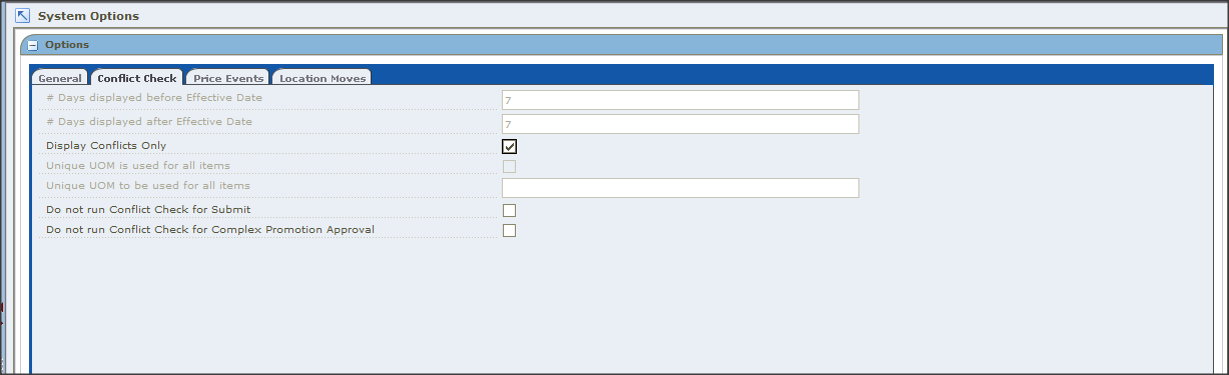
RPM System Options – Conflict Check Tab
 ·
# Days displayed before
Effective Date
·
# Days displayed before
Effective Date
–
The number of days
before the VDATE that a pricing event is displayed in the Conflict Review Check
window.
–
Table Reference: RPM_SYSTEM_OPTIONS.CONFLICT_HISTORY_DAYS_BEFORE
·
# Days displayed after
Effective Date
–
The number of days after
the VDATE that a pricing event is displayed in the Conflict Review Check window
–
Table Reference: RPM_SYSTEM_OPTIONS. CONFLICT_HISTORY_DAYS_AFTER
 ·
Display Conflicts Only
·
Display Conflicts Only
–
When selected, only the
record that caused the conflict will be displayed in the lower portion of the
Conflict Review List window
–
When unchecked and the
days before/after are provided, the system will search for all records using
the price event’s effective date as the point to search forward and back. This
will bring back all records within the window of time calculated.
–
Multiple records are
displayed in the conflict review list window so that if one rule returns
conflicts for multiple item/locs in a price event, all those conflicts are
displayed. This is limited to a maximum of 100 records.
–
Table Reference: RPM_SYSTEM_OPTIONS.
DISPLAY_CONFLICTS_ONLY
 ·
Unique UOM is used for
all items
·
Unique UOM is used for
all items
–
(DBA maintained) When
selected, you have to specify which UOM should be used when fixed price events
are created and the system will skip the UOM validation
–
Table Reference: RPM_SYSTEM_OPTIONS.
IS_UNIQUE_UOM
–
Unique UOM to be used
for all items
–
(DBA maintained)
Specifies which unique UOM needs to be Used
–
This is a required field
if "Unique UOM is used for all items" option is checked
–
Table Reference: RPM_SYSTEM_OPTIONS. UOM_VALUE
 ·
Do not run Conflict
Check for Submit
·
Do not run Conflict
Check for Submit
–
When checked, the system
will skip conflict checking process when the user clicks the Submit button
–
Table Reference: RPM_SYSTEM_OPTIONS.
DO_NOT_RUN_CC_FOR_SUBMIT
·
Do not run Conflict
Check for Complex Promotion Approval
–
When checked, the system
will skip conflict checking process when the user approves a Complex Promotion
–
Table Reference: RPM_SYSTEM_OPTIONS.DO_NOT_RUN_CC_FOR_CP_APPROVAL
RPM System Options – Price Events Tab

 ·
Price Change/Promotion
Overlaps
·
Price Change/Promotion
Overlaps
–
When selected, indicates
an item/location can have a price change can be approved during the middle of
an active promotion
–
If unchecked, a price
change cannot overlap with a promotion at any point on the item/loc timeline
–
Table Reference: RPM_SYSTEM_OPTIONS.
PRICE_CHANGE_PROMO_OVERLAP_IND
·
Cost Calculation Method
–
Defines how, when zones
are used in the price change, promotion, clearance, and worksheet dialogs, to
calculate the cost at each location in the zone to come up with a cost to
represent the zone Valid Values: Highest Location Cost or Average Location
Cost
–
Table Reference: RPM_SYSTEM_OPTIONS. COST_CALCULATION_METHOD
 ·
Clearance/Promotion
Overlaps
·
Clearance/Promotion
Overlaps
–
When selected, indicates
an item/location can be on clearance and promotion at the same time
–
If selected, a clearance
cannot overlap with a promotion at any point on the item/loc timeline
–
If unselected, a
clearance can be approved during a promotion.
–
Table Reference: RPM_SYSTEM_OPTIONS.
CLEARANCE_PROMO_OVERLAP_IND
·
Multiple Item/Loc
Promotions
–
If the indicator is set
to Yes (checked), an item can have its retail price affected by more than one
promotional discount at a single time in a given location
–
If the indicator is set
to No (unchecked), only one promotional discount can exist at the same time for
a given item/location.
–
Table Reference: RPM_SYSTEM_OPTIONS. MULTI_ITEM_LOC_PROMO_IND
 ·
Maximum Number of
Overlapping Promotion Component Details
·
Maximum Number of
Overlapping Promotion Component Details
–
The number of
overlapping promotion components allowed for any single item/location
–
The default value is 4
–
Works in tandem
with Multiple Item/Loc Promotions System Option
–
Table Reference: RPM_SYSTEM_OPTIONS.
MAX_OVRLP_PROM_COMP_DETAIL
·
Allow Complex Promotions
–
Indicates whether or not
complex promotions can be defined
–
If checked then all
promotion types are available
–
If unchecked then only
simple promotions can be defined
–
Threshold and Buy/Get
will not appear in the promotions dialog when the indicator is set to unchecked
–
Table Reference: RPM_SYSTEM_OPTIONS. COMPLEX_PROMO_ALLOWED_IND
 ·
Purge Reset Clearance
Months
·
Purge Reset Clearance
Months
–
The number of months RPM
will retain clearance price events that have reset before purging them
–
Table Reference: RPM_SYSTEM_OPTIONS.
CLEARANCE_HIST_MONTHS
·
Default Reset Date
–
When selected, indicates
a reset date should be defaulted when a clearance is created
–
The reset date is
defaulted to one day greater than the out of stock date
–
Table Reference: RPM_SYSTEM_OPTIONS. DEFAULT_RESET_DATE
 ·
Promotion End Date
Required
·
Promotion End Date
Required
–
When selected, a
promotion end date is required for the promotion header
–
Table Reference: RPM_SYSTEM_OPTIONS.
PROMO_END_DATE_REQUIRED
·
Promotion # Days Reject
Held
–
The number of days, set
in system options, after the end date (or start date for promotions with no end
date) of a rejected promotion that it is purged from the system
–
Table Reference: RPM_SYSTEM_OPTIONS. REJECT_HOLD_DAYS_PROMO
 ·
Price Change Processing
Days
·
Price Change Processing
Days
–
The number of days,
between the creation date of a price change and the first date it can become
effective
–
It allows the retailer
to ensure that price changes are created with enough advance timing that stores
and other process areas can React
–
Table Reference: RPM_SYSTEM_OPTIONS.
PRICE_CHANGE_PROCESSING_DAYS
·
Promotion History Months
–
The number of months,
set in system options, after a promotion is completed that is purged
–
This parameter is also
used to purge canceled promotions
–
Table Reference: RPM_SYSTEM_OPTIONS. PROMOTION_HIST_MONTHS
 ·
Filter Price
Change/Clearance Results
·
Filter Price
Change/Clearance Results
–
When selected, the user
is taken to a filter window that displays the search results for price changes
and clearances
–
This column will decide
whether the Maintain Price Change/Clearance screen should go to the
intermediate result screens or go directly to the Price Change/Clearance Editor
screen
–
Table Reference: RPM_SYSTEM_OPTIONS.
FILTER_PRICE_CHANGE_RESULTS
·
Display Full Promotion
Column Detail
–
When selected, all
columns in the table are displayed
–
If this option is not
selected, not all columns are displayed. If the user wants to review the
details for the remaining columns, the user can do so by selecting rows and
requesting the additional data
–
Table Reference: RPM_SYSTEM_OPTIONS.
FULL_PROMO_COL_DETAIL
 ·
Display Full Price
Change/Clearance Column Detail
·
Display Full Price
Change/Clearance Column Detail
–
When selected, all
columns in the table are displayed
–
If this option is not
selected, not all columns are displayed. If the user wants to review the
details for the remaining columns, the user can do so by selecting row(s) and
requesting the additional data
–
Table Reference: RPM_SYSTEM_OPTIONS.
FULL_PC_COL_DETAIL
·
Event Id Requried
–
When selected, a promotion
event must be assigned to the promotion
–
Table Reference: RPM_SYSTEM_OPTIONS.
EVENT_ID_REQUIRED
 ·
Display And / Or
Condition
·
Display And / Or
Condition
–
When selected, this
option allows OR conditions to be used when a multibuy promotion component
contains multiple buy lists or reward lists
–
If this option is not
selected, only AND conditions can be used.
–
Table Reference: RPM_SYSTEM_OPTIONS.
DISPLAY_OR_CONDITION
·
Maximum Number of Buy
List
–
This option specifies
the maximum number of buy lists allowed for a multibuy promotion component
–
Table Reference: RPM_SYSTEM_OPTIONS.
MAX_BUY_LISTS
 ·
Maximum Number of Reward
Lists
·
Maximum Number of Reward
Lists
–
This option specifies
the maximum number of reward lists allowed for a multibuy promotion component
–
Table Reference: RPM_SYSTEM_OPTIONS.
MAX_REWARD_LISTS
·
Number of past markup
impact events displayed
–
The maximum number of
past dates that have a cost or retail change to be displayed in the Markup
Change Date column, used to review cost/retail change history
–
The value of this option
can be an integer from 1 to 10 (default 1)
–
Table Reference: RPM_SYSTEM_OPTIONS.
PAST_MARKUP_EVENTS_DISP_CNT
·
Maximum Number of
Promotion Component Details per Promotion Component
–
Specifies the maximum
number of promotion component details for a promotion component
–
Table Reference: RPM_SYSTEM_OPTIONS. MAX_PROMO_COMP_DETAIL
 ·
Price Changes
·
Price Changes
–
The maximum number of
search rows returned for price changes
–
Table Reference: RPM_SYSTEM_OPTIONS.
PRICE_CHANGE_SEARCH_MAX
·
Clearances
–
The maximum number of
search rows returned for clearances
–
Table Reference: RPM_SYSTEM_OPTIONS.
CLEARANCE_SEARCH_MAX
–
If the search limit is
reached, a message is displayed informing users that they will not see all of
their search results
 ·
Promotions
·
Promotions
–
The maximum number of
search rows returned for promotions
–
Table Reference: RPM_SYSTEM_OPTIONS.
PROMOTION_SEARCH_MAX
·
Price Inquiry
–
The maximum number of
search rows returned for price inquiry.
–
Table Reference: RPM_SYSTEM_OPTIONS. PRICEINQUIRY_SEARCH_MAX
·
Clearance Resets Inquiry
–
This column stores value
for the max number of rows that could be fetched in clearance reset inquiry UI
–
Table Reference: RPM_SYSTEM_OPTIONS. CLEARANCE_RESET_INQUIRY_MAX
o
Ø If the
search limit is reached, a message is displayed informing users that they will
not see all of their search results
RPM System Options – Location Move
 ·
Location Move Lead Time
·
Location Move Lead Time
–
The number of days (Lead
Time), set in system options, required before a location can be moved between
zones in RPM
–
Table Reference: RPM_SYSTEM_OPTIONS. LOCATION_MOVE_PROCESSING_DAYS
·
Location Move Purge Days
–
The number of days RPM
will retain location moves that have either successfully completed or are the
same number of days past the scheduled effective date but have had no action
taken on them
–
Table Reference: RPM_SYSTEM_OPTIONS. LOCATION_MOVE_PURGE_DAYS
 ·
Promotion Overlap
·
Promotion Overlap
–
When selected,
promotions are allowed to overlap a scheduled location move
–
If selected, a Promotion
Overlap Behavior option must be selected
–
If Promotion Overlap is
not selected (default), promotions cannot overlap a scheduled location move
–
Table Reference: RPM_SYSTEM_OPTIONS. LOC_MOVE_PROM_OVERLAP
·
Promotion Overlap
Behavior
–
When Promotion Overlap
is selected, one of these behavior options must also be selected:
Do not start existing promotion and inherit new
promotion: The location does not
start the promotion if the zone promotion overlaps the move date. The location
inherits a promotion in the new zone that overlaps the move date. The inherited
promotion starts on the same day that the zonelevel promotion starts, or it
starts the day the move is scheduled if the zonelevel promotion is already active.
End existing promotion and inherit new
promotion: The existing promotion
ends at the location on the evening before the move date. The location inherits
a promotion in the new zone that overlaps the move date, but the promotion
starts on the location move date.
Extend existing promotion and do not inherit new
promotion: The location continues
to run the promotion from the old zone. The location does not inherit a zonelevel
promotion for the new zone if the promotion overlaps the move date
–
Table Reference: RPM_SYSTEM_OPTIONS. LOCATION_MOVE_PROCESSING_DAYS
 ·
Inherit New Zones
Regular Retail
·
Inherit New Zones
Regular Retail
–
When selected, the
location inherits the retails of the new zone
–
If not selected
(default), the zone keeps the existing retail
–
Table Reference: RPM_SYSTEM_OPTIONS. LOC_MOVE_PRICE_CHANGES
·
Pricing Strategy Review
Period Overlap
–
When selected, pricing
strategies with review periods are allowed to overlap a move date. The
validation of a worksheet review period is bypassed, and a location move can be
scheduled
–
When unchecked
(default), validation is not bypassed
–
Table Reference: RPM_SYSTEM_OPTIONS. LOC_MOVE_PS_REVIEW_OVERLAP
Understanding System
Defaults
RPM also provides option
to have default values for certain fields that can be configured.


·
Item Level
–
Default indicator to
define the item level that will be displayed when the user enters the price
change and clearance dialogs
–
Valid Values are: Parent
Level, Parent/Diff Level, Transaction Level
–
Table Reference: RPM_SYSTEM_OPTIONS_DEF.
DEF_PRICE_CHANGE_ITEM_LEVEL
·
Pricing Strategy
–
This field will hold a
value for the default pricing strategy type that will be displayed when the
user is creating new pricing strategies
–
Valid Values: Area
Differential, Clearance, Competitive, Margin, Maintain Margin
–
Table Reference: RPM_SYSTEM_OPTIONS.
DEF_PRICING_STRATEGY
 ·
Diff Type
·
Diff Type
–
The category that a diff
belongs
–
Values are valid diff
types from the Merchandising System
–
Table Reference: RPM_SYSTEM_OPTIONS_DEF.
DEF_PRICE_CHANGE_DIFF_TYPE
·
Type
–
The type is the default
price change type displayed when creating a price change
–
Valid Values: Change
by Amount, Change by Percent, Fixed Price
–
Table Reference: RPM_SYSTEM_OPTIONS.
DEF_PRICE_CHANGE_TYPE
·
Currency
–
The primary currency
used in RPM
 ·
Maintain Margin Strategy
Method
·
Maintain Margin Strategy
Method
–
Defines the default
method used when creating a maintain margin pricing strategy
–
Valid Values are: Market
Basket Margin, Current Margin
–
Table Reference: RPM_SYSTEM_OPTIONS_DEF.
DEF_MAINT_MARGIN_METHOD
·
Ignore Constraints
–
Defines whether or not
promotion constraints are taken into account when conflict checking is
performed in the worksheet
–
Valid Values: Change
by Amount, Change by Percent, Fixed Price
–
Table Reference: RPM_SYSTEM_OPTIONS.
DEF_WKSHT_PROMO_CONST_IND
This is all about
various System Options and Defaults available in RPM Options. Please do drop a
note in case you have any questions or comments. In next article, we’ll be
talking about RPM Foundations before getting more into Transactional
Functionalities (Price Change, Promotion, Clearance etc.)
Please do let me know in case of any questions, comments for feedback. Thanks
 Deep Div...)

About Nagesh Mishra
Nagesh Mishra - A Passionate Oracle Retail Certified Professional with more than 17 years of overall experience in IT industry and more than 15 years of domain expertise in Oracle Retail Applications. Worked extensively in diversified fields of Product Implementation, Business Consulting, Pre-Sales, Application Software Development, Maintenance and Support and Re-Engineering Oracle Retail projects.
0 comments :
Post a Comment